

Scrolling the board
There are 4 ways to scroll the board:
Pressing SPACE again re-selects the last tool selected.
- On the left Toolbar select Pan (or press key P or press SPACE* or double click on the workspace) and drag the workspace to a new position
- Press the PgUp or PgDn keys;
- Press the Arrow keys when there are no objects selected.
- Move the mouse while keeping the SHIFT key pressed.
Zooming the board
Zooming is when you change the magnification level of the view of your board. You can zoom in for a more microscopic view or zoom out for a more telescopic view. For example, you can zoom out to see the whole board or zoom in to look closely at a particular detail. Below are the different ways you can zoom in Pad2Pad:
To zoom in or out:
- Press the “+” or “–” key
- Choose View | Zoom | In or Out
- On the top toolbar select Zoom and left or right click anywhere on board
- On the top toolbar Zoom section select a value from the drop-down list
To zoom to actual size:
- Press the “1” key
- Choose View | Zoom | 100%
- On the Zoom toolbar click “1:1”
To zoom the board to fit the screen:
- Press the “=” key
- Choose View | Zoom | To Fit
- On the Zoom toolbar press “X” or select “To Fit“
To fit a selection to the screen:
- Press the “0” key
- Choose View | Zoom | To Selection
To zoom the board to a specific zoom level:
- On the Zoom toolbar select a value from the drop-down list.
To zoom in to a specific area of the board:
The Zoom In and Zoom Out commands switch to the nearest zoom factor available in the drop-down list on the Zoom toolbar:
10%; 25%; 50%; 75%; 100%; 150%; 200%; 500%; 1000%; 1500%; 2000%; 5000%.
If zooming is slow, consider disabling smooth zooming by unchecking the Use smooth zoom checkbox at Edit | Preferences | General.
- Select the Zoom tool.
- Click and drag the mouse cursor to select a rectangular area.
Using View Manager
A View is a specific combination of zoom factor and scroll position. You can save different views of your board layout using the View Manager. For example, you might want one view to be the power supply portion of a design and another view to be a microprocessor section.
To show the view manager choose View | Toolbars | View Manager.
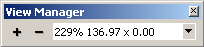
To save a particular view of your board:
- Use the Zoom and Pan tools to create the view you want to save.
- Click the “+” button on the view manager as shown above.
- Repeat to store additional views.
To switch between saved views:
- Click the dropdown list of the view manager as shown above and select the desired view.
To delete a saved view:
- Click the “–” button.
Layers
A layer is one plane of the board. For example the top side silk screen is a layer and the top side copper is another layer. There are several layers:
- The Board layer specifies the edge shape of the board and any cutouts or mounting holes.
- The Top and Bottom layers (also called Signal layers) specify the copper patterns of pads, footprints, traces, etc.
- The Top Silk and Bottom Silk layers specify the silkscreen text, outlines, identification codes, etc.
- The Top unMask and Bottom unMask layers specify the shape of the areas of the board to be unmasked by the solder mask. Unmasked regions can be soldered. For example if you draw a small rectangle on the unMask layer a small rectangle of area will not be masked. (The unMask layer is usually created automatically – you will see that pads are generally unmasked.) To unmask an object on top/bottom copper layer, the Edit | Unmask command can be used.
- The Attribute layer specifies identifiers and comments for your own reference and will not be seen or used in the manufacture of your board.
To place a new object onto a specific layer:
The bottom layers are shown as if looking thru the top side of a transparent board. You can move an object from one layer to another. For example, you might want to move an SMT device from the top copper layer to the bottom copper layer.
- Choose a tool that is appropriate for creating the object such as the trace tool.
- On the Property Bar choose a layer from drop-down list of available layers.
- Place the object.
To move object(s) to another layer:
When trace segments are moved between layers, Pad2Pad automatically creates via-holes to maintain electrical connections.
You can show or hide layers from view. For example, it can be helpful to hide all layers except the copper layers to avoid distractions while checking your board prior to placing an order.
- Select the object(s) to move.
- On the Property Bar Layer drop-down list choose the desired layer.
To turn layers on/off:
You can change the colors of each layer. For example you might prefer blue to green for the top copper layer.
- On the left toolbar click the Layers button.
- Click the corresponding checkmark in the Visible column or click the Visible column header to turn on/off all layers.
To change the color of layers:
- In the Layers dialog, select a layer to change.
- From the color drop list choose the desired color.
Status Bar
The Status Bar is a strip of information located at the bottom of the application window. Here, you can see the current cursor coordinates, grid parameters, and layout tips. For example, you can use this info to fine tune the position of layout items and control the grid settings.
The status bar contains:
- Description of any button being pointed to by the mouse.
- Coordinates of the mouse pointer.
- Grid settings – you can use this drop list to change the settings.
- Grid snapping – click on this field to toggle snapping on/off.
Object Properties
An object is an element of your design such as a trace, pad, or component footprint. An object property is some aspect of the object such as it’s name, position, dimensions, or rotation angle. You can view and edit the properties of an object. For example, you might want to view or change the width property of a trace.
To view or change object properties:
If several objects are selected, the Property Bar will not show values of those properties that differ between selected objects. For example, if you select several pads of different sizes, the property bar will not show the size property.
- Select the object
- Review the Property Bar.
- If desired enter a new value to change a property.
- You can edit each property manually – see Property Bar.
- You can change some object properties via the context menu that appears when the right mouse button is clicked.
- You can select all objects of the same type as a selected object. For example, to select all pads, right click on one pad and choose Select | Select all
- You can select all traces and pads connected to a selected copper layer object. For example, you might want to select all objects electrically connected to U3 pin 7. To select all connected objects, right click on the object and choose Highlight | All connected traces and pads.
Board statistics
Board statistics are various pieces of information about your board such as the number of holes or the minimum trace width. You can view your design’s statistics at any time. For example, you might want to view the number of holes in a board to try to reduce the hole count.
To view statistics for the currently active printed circuit board design:
- Choose Tools | Statistics.
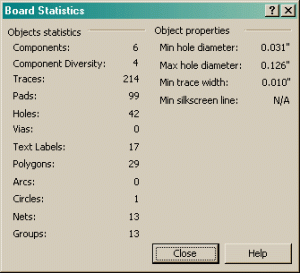
“Components” is the overall number of footprints placed on the board. “Components Diversity” is the number of different footprint types.